
Backtesting the Aroon Filter on Any Stock [Free Backtest File]
Published on October 24, 2026 | 10 min readTable of Contents
- Key Takeaways
- What is the Aroon indicator?
- How do you use Aroon in the scanner?
- Why backtest an Aroon signal?
- The Option Samurai Aroon backtest
- Does a fresh uptrend help? Valero (VLO)
- Why check both bearish signals?
- Does "no clear trend" mean a quiet market?
- What should you check before trading?
- A real example from the scanner
- Run your own Aroon backtest
Reviewed by Leav Graves
Table of Contents
- Key Takeaways
- What is the Aroon indicator?
- How do you use Aroon in the scanner?
- Why backtest an Aroon signal?
- The Option Samurai Aroon backtest
- Does a fresh uptrend help? Valero (VLO)
- Why check both bearish signals?
- Does "no clear trend" mean a quiet market?
- What should you check before trading?
- A real example from the scanner
- Run your own Aroon backtest
New to Aroon? This guide shows what its signals mean, how to find them in the Option Samurai scanner, and how to check whether a signal has worked on the stock you want to trade.
KEY TAKEAWAYS
- The Aroon indicator shows how recently a stock made a high or low. Its two lines help you see whether an uptrend, downtrend, or neither is taking shape.
- The Aroon filter lets you scan for a trend or a fresh change. A trend ending and the opposite trend beginning are separate signals.
- The free Aroon backtest checks each signal on your stock. Look at the Edge column: it compares what happened after the signal with what usually happened after any day.
- "No clear trend" does not always mean a quiet stock. Reading Aroon Up and Down separately can help distinguish a quiet range from a choppy one.
- How to use it in your trading: once you are bullish or bearish on a stock, Aroon helps you time the entry. Run the backtest on that stock, then use the scanner filter that matched: for example, sell puts or bull put spreads on stocks with a fresh or established uptrend, or look at bearish trades like bear call spreads when an uptrend has just ended. The signal is a timing input for the option trades you already build in Option Samurai - not a trade by itself.
What is the Aroon indicator?
Aroon tracks when a stock last made a new high and a new low over a chosen period. Aroon Up rises when a high is recent. Aroon Down rises when a low is recent. Subtract Down from Up and you get the Aroon Oscillator. It runs from -100 to +100: positive means the high is more recent, while negative means the low is more recent.
This is what the Aroon Oscillator will look like in Option Samurai:
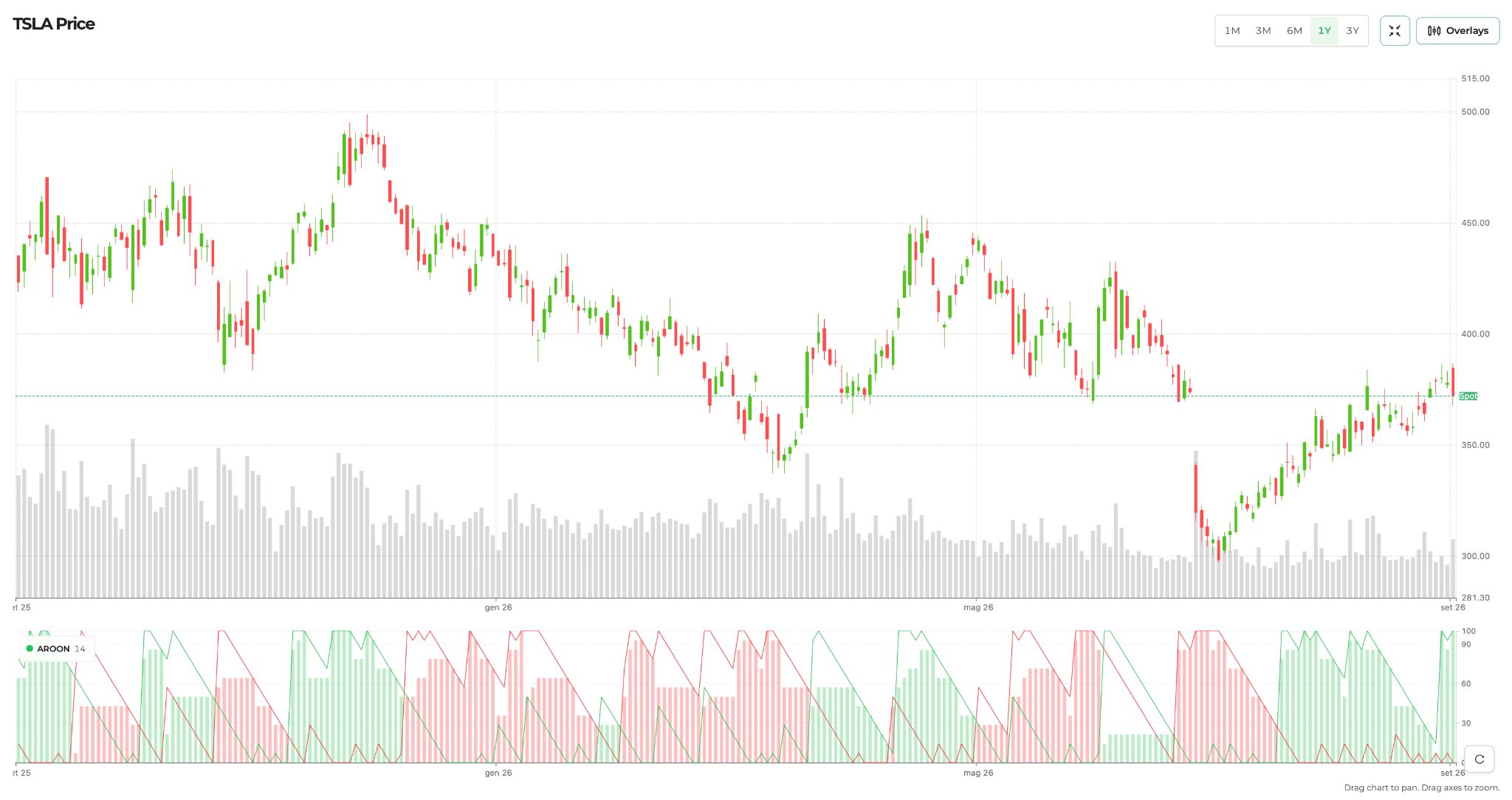
The oscillator is visible as a bar chart, whereas the two lines represent the Aroon Up (Green) and the Aroon Down (Red).
Think of it as a way to spot the direction of a trend and the moment that direction changes. It does not tell you that the next trade will win, but it manages to give you a quick chart read in a few seconds, as you can see in the TSLA example above.
How do you use Aroon in the scanner?
Option Samurai has three broad readings:
- Uptrend: find stocks with an established upward reading.
- Downtrend: find stocks with an established downward reading.
- No clear trend: find stocks between the two trend zones.
Furthermore, we also allow you to check for a signal change:
- Moved into uptrend: catch a newly positive trend reading.
- Moved out of uptrend: catch an uptrend that has just ended.
- Moved into downtrend: catch a new downward trend reading.
- Moved out of downtrend: catch a downtrend that has just ended.
Just as a note, keep in mind that "Moved out of uptrend" does not mean "moved into downtrend." The Oscillator can spend time between those zones. You can also add the separate Aroon Up and Down filters to narrow the scan.
Why backtest an Aroon signal?
Our reasoning here is simple: a scan shows you which stocks match today, and the backtest tells you whether the same reading has helped on this particular stock before. It can also show you when a promising-looking signal is no better than picking a day at random. That is worth checking before you build an options trade.
Most of us would not trade a technical signal on its own - and that is not what this backtest is for. The practical use is timing: once your fundamental or directional view on a stock is set, the backtest tells you whether waiting for (or acting on) an Aroon signal has historically improved entries on that specific stock. It works best as a second opinion next to your other checks - the options data, IV rank, liquidity, and your own thesis - not as a trigger by itself.
The Option Samurai Aroon backtest
The free notebook linked at the bottom of this article finds the past days that passed each filter and measures the stock's move over the following ten trading days. It compares that result with the stock's average ten-day move after any day in the sample. The difference, in percentage points, is called Edge.
Edge = average move after the signal - average move after any day.
A positive edge means the stock did better than usual. A negative edge means it did worse than usual, even if it still moved in the direction you’d expect. The examples below use daily data from 2019 where available, the scanner's 14-period Aroon setting, and a ten-trading-day horizon.
Does a fresh uptrend help? Valero (VLO)
Valero shows how to read a fresh signal. Select VLO and "Moved into uptrend" in the notebook:
VLO, 2019- 2026 | Events | Avg 10-day move | Median | % up | Edge |
|---|---|---|---|---|---|
Moved into uptrend | 70 | +3.69% | +2.24% | 66% | +2.34 |
Any day (baseline) | 1,920 | +1.35% | - | 56% | - |
Start with the Edge column: +2.34 points means Valero did better after a fresh Aroon uptrend than it did after an average day. The median is also positive, but 70 events are still a limited sample, and the chart's wide band shows that individual outcomes vary.
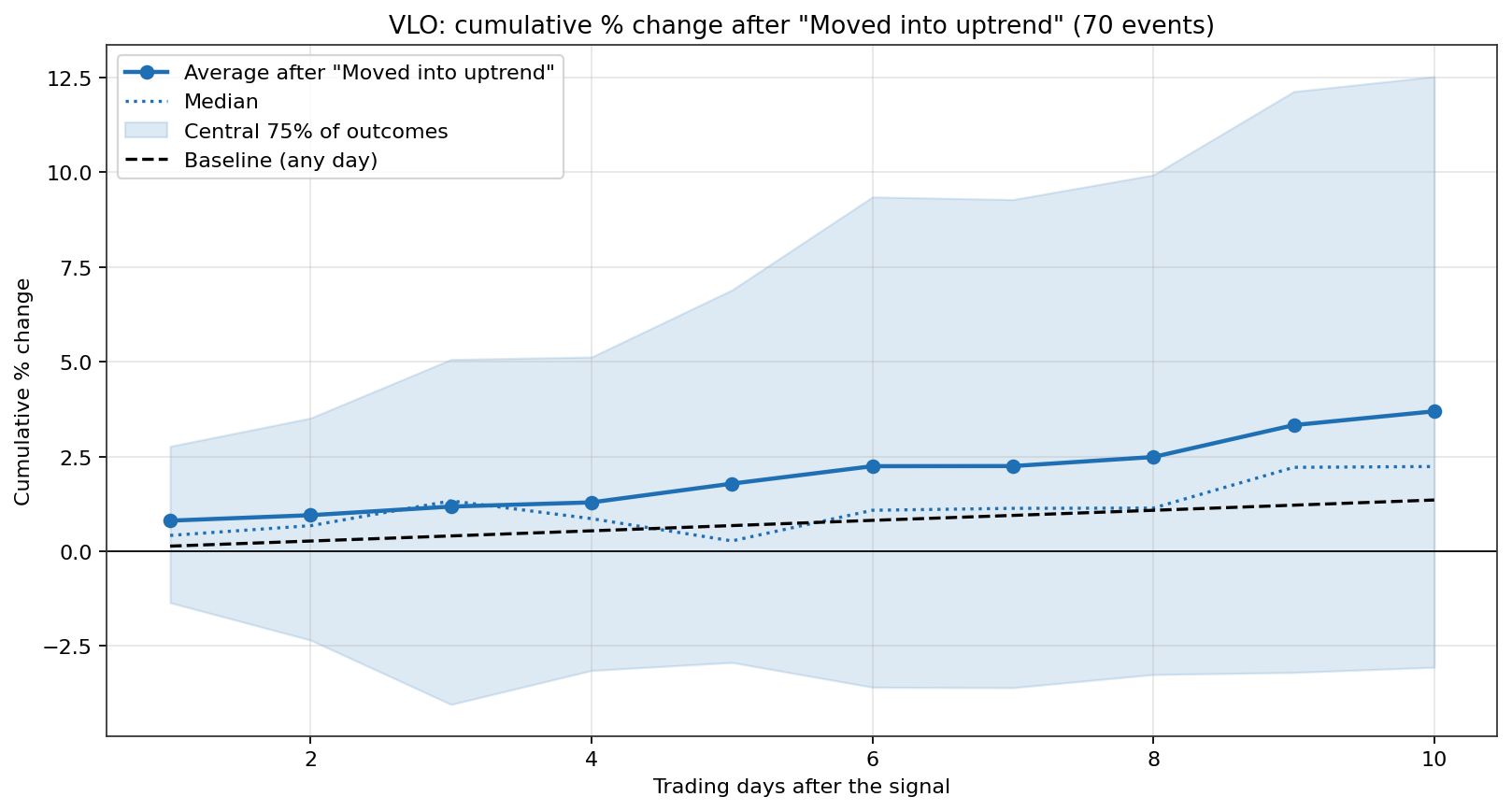
The image above gives you Valero's average and median moves after "Moved into uptrend," against the any-day baseline.
Why check both bearish signals?
We’ll say that again: an uptrend ending is not the same event as a downtrend starting. The first fires when the Aroon Oscillator falls below +50; the second when it falls below -50. On a stock that lingers in between, the two can happen far apart.
Stock | Moved out of uptrend: Edge | Moved into downtrend: Edge |
|---|---|---|
Palantir (PLTR) | -3.11 | +1.41 |
Tesla (TSLA) | -0.56 | -4.27 |
Here the important columns are the two Edge results. A negative number fits a bearish signal: on Palantir the uptrend ending was the useful warning, while the later downtrend signal did worse as a warning. On Tesla it was the other way around. These historical averages are not a promise that either signal will work next time. Run both on the stock you are considering rather than treating them as interchangeable.
Does "no clear trend" mean a quiet market?
Not always. An Oscillator near zero means the recent high and low are similarly old. That can describe a quiet range, or a choppy market making fresh highs and lows. Aroon Up and Down tell those situations apart.
UnitedHealth (UNH) illustrates the difference. With both lines at or below 30, the quiet group had a narrower range of ten-day outcomes. With both lines at or above 70, the two-sided group had a wider one:
UNH, 2019- 2026 | Days | Avg 10-day move | Spread of outcomes |
|---|---|---|---|
Both lines low (quiet) | 90 | +1.70% | 4.30% |
Both lines high (two-sided) | 70 | -2.16% | 8.72% |
This table has no directional Edge column: here the column to compare is Spread of outcomes. It was smaller in the quiet group and larger in the choppy group. That does not mean every "no clear trend" signal is calm, or that a range trade is automatically safe.
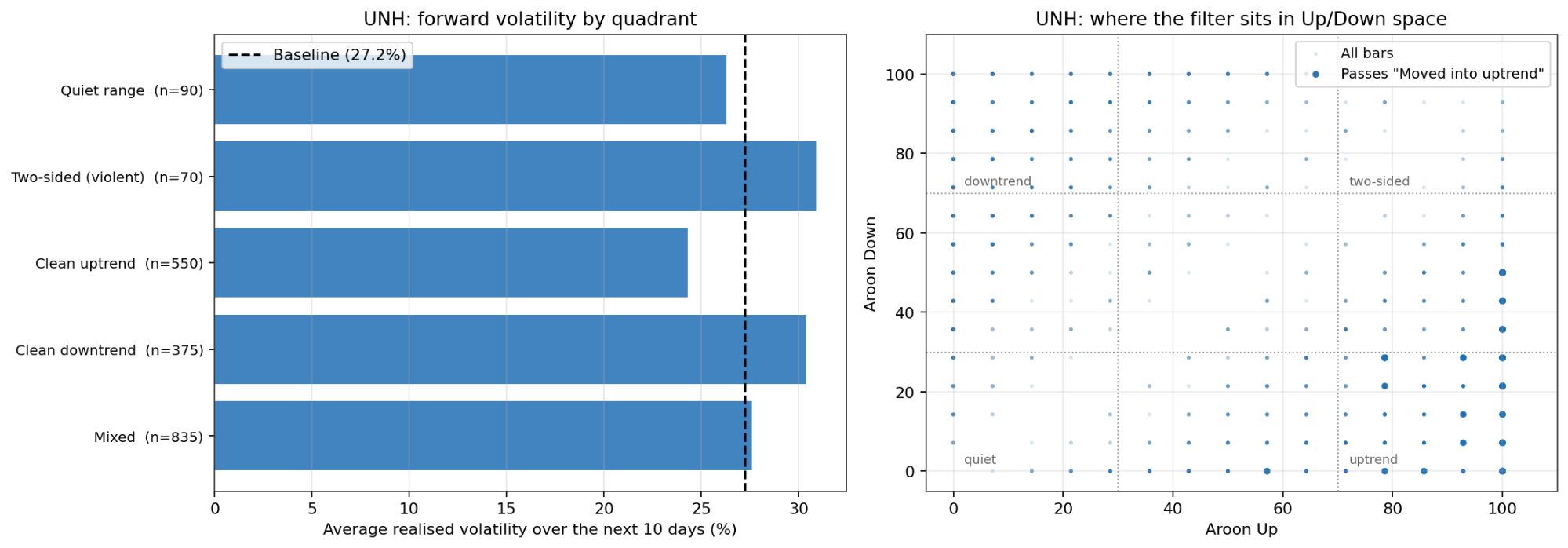
The image above contains two charts that start from the same idea: do not read the Oscillator alone; place each day by its two Aroon lines separately.
The chart on the left, forward volatility by quadrant, sorts every day in the 2019-2026 UNH sample into five groups by its Aroon Up and Aroon Down readings: Quiet range (both lines at or below 30, 90 days), Two-sided (both at or above 70, 70 days), Clean uptrend (Up at or above 70 with Down at or below 30, 550 days), Clean downtrend (the mirror image, 375 days), and Mixed (everything in between, 835 days). Each bar is the average realized volatility over the ten trading days that followed: the standard deviation of the daily moves inside that window, annualized. The dashed line is the baseline, 27.2%, the same measure taken across every day in the sample.
Now read the bars against that line. Quiet days came in at 26.3%, just under the baseline. Two-sided days came in at 30.9%, clearly above it. The trend corners behave as a trader would expect: the clean uptrend was the calmest group at roughly 24%, the clean downtrend was nearly as wild as the two-sided one at about 31%, and the mixed middle sat right on the baseline. On the Oscillator, both lines near zero and both lines high can look like the same reading. The volatility that followed was not the same at all.
The chart on the right is the map behind those groups:
- Each dot is one trading day, plotted with its Aroon Up on the horizontal axis and its Aroon Down on the vertical one.
- The dots sit on a grid because a 14-period Aroon moves in fixed steps of about 7 points.
- The dotted lines at 30 and 70 cut the space into four labeled corners: quiet (lower left), two-sided (upper right), uptrend (lower right), downtrend (upper left). Anything between the corners falls into "Mixed" in the bar chart.
- The darker dots are the days that passed the "Moved into uptrend" filter in this run - they cluster exactly where the definition says they should, in the uptrend corner.
Whichever filter you select in the notebook, this panel shows you where its days live.
Why show volatility when the table already gave a spread? They are two lenses on the same dispersion:
- The Spread column is the standard deviation of the ten-day net moves - how far apart the endpoints landed: 4.30% in the quiet group against 8.72% in the two-sided one.
- The bars measure the daily swings inside those ten days, annualized: 26.3% against 30.9%. Endpoints versus path.
They tell the same story, and the bars add the trend quadrants around it.
If you want a quiet-range scan, combine "No clear trend" with low Aroon Up and low Aroon Down instead of relying on the Oscillator alone. Test that combination on your chosen stock.
What should you check before trading?
- Count the events: a large edge based on a handful of crossings is fragile.
- Read Edge, not just the return: the baseline can change the conclusion.
- Compare the average and median: a wide gap may mean a few unusual days dominate.
- Test related signals separately: a trend and a fresh crossing can tell different stories.
- Try another Aroon length and time horizon: be cautious if the result reverses.
- Check the more recent years: a pattern confined to old data may not help now.
These are historical averages, not trade instructions. The same signal can behave differently on another stock or in another market. Once you know what the signal has done, return to the scanner to check liquidity, IV rank, and whether an actual defined-risk trade makes sense.
A real example from the scanner
To see how this looks in practice, we ran the Long call scan with Aroon today. It looks for calls on stocks where the Aroon Oscillator just moved into uptrend, with strikes within 2% of the stock price, expiry between 23 and 30 Oct, a bid ask spread under 50 cents and a breakeven below 5%.
Five stocks came back: JPM, TTD, CELH, M and TSCO. We're using CELH for the example, and we'll explain why in a moment. The trade is a single long 28 call on Celsius expiring 23 Oct, with the stock at $28.23. The bid is $0.75 and the ask is $0.91, so the most we can lose is about $91 per contract. The breakeven is $28.91, which is 2.41% above the current price. Delta is 56.89 and open interest is 709 contracts. The spread is 16 cents on a 91 cent option. That is wide, and buying at the ask means starting a bit under water. We clicked the row to open the trade detail below the table.
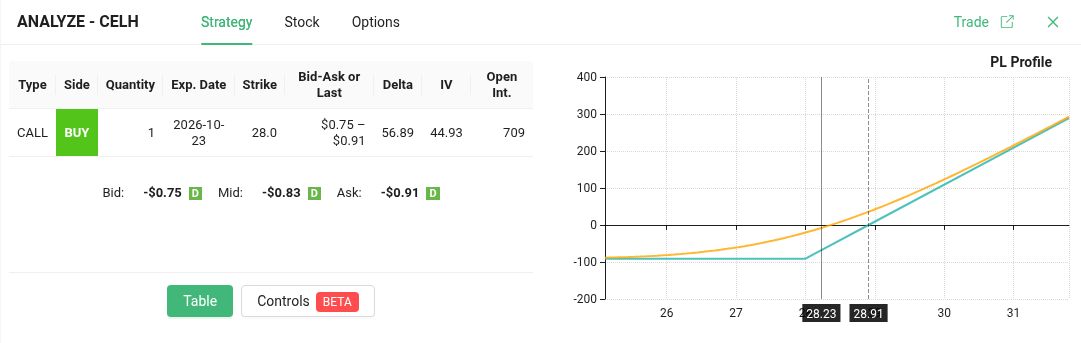
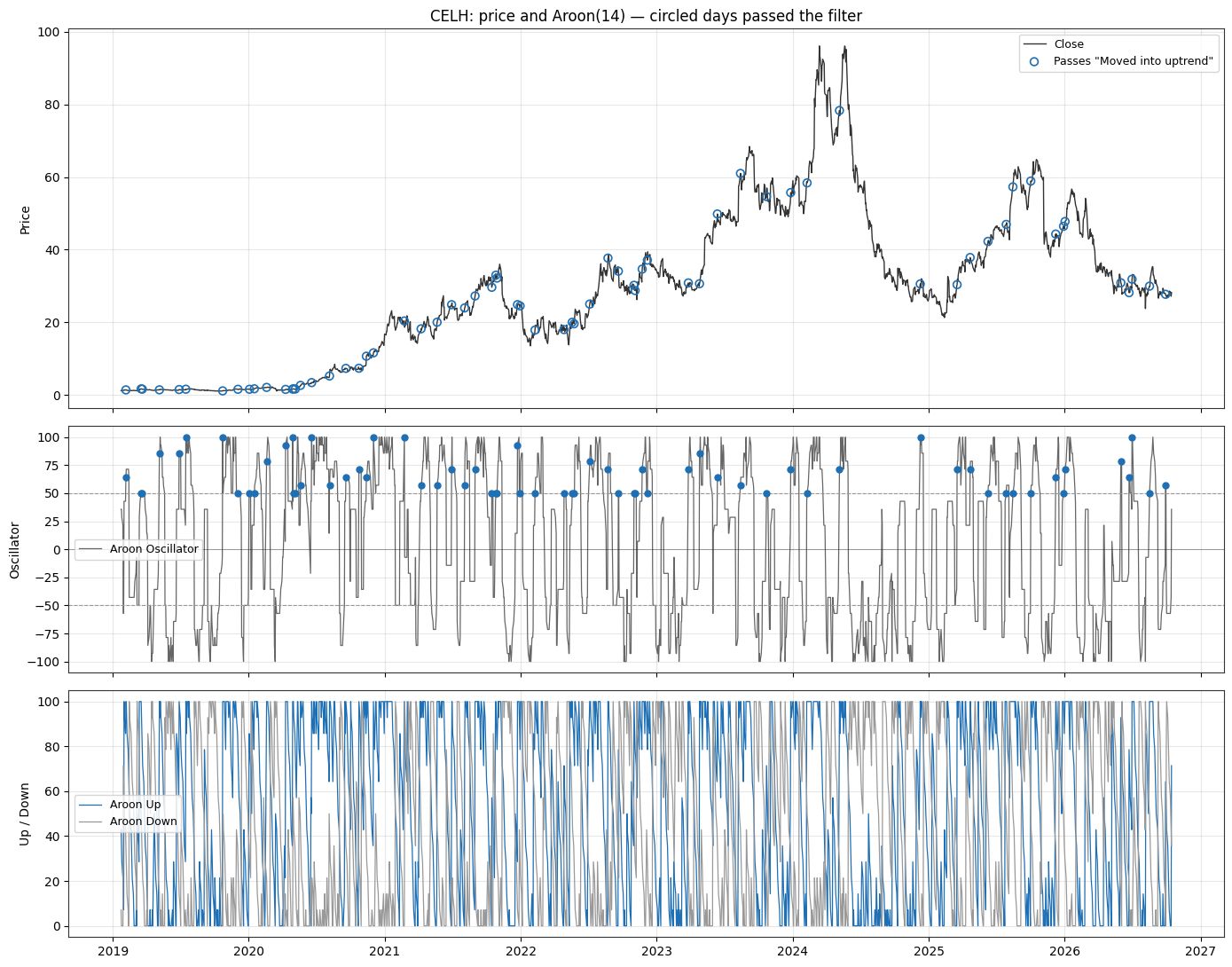
So, let's see if it works with our backtest. Same notebook, same filter, Moved into uptrend, a 14 day Aroon, data from 2019 and a 10 day horizon.
And here is where those signals fired on CELH: each circle marks a day that passed the filter, with the Aroon Oscillator and the two Aroon lines underneath.
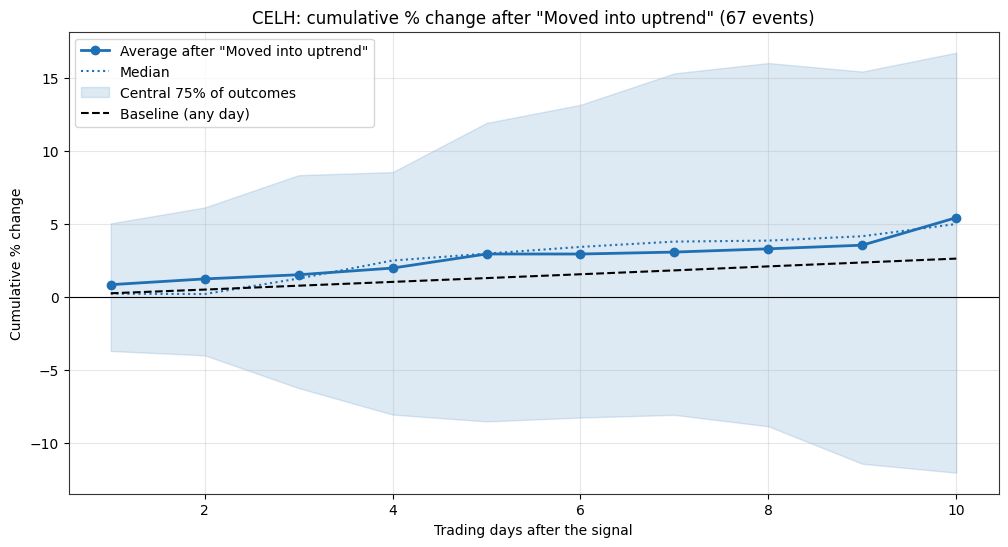
It does, at least on this stock. CELH had 67 events. Ten days after the signal it was up 5.44% on average, against 2.64% for any random day, so the edge is 2.80 points. The median was +5.01% and 67.2% of the events ended positive. The average and the median are close, so a few big jumps are not doing all the work.
Now the fine print. We picked CELH after running the backtest on all five stocks from the scan, and only CELH and M showed a positive edge, with M's coming from a handful of large moves. So this is a good case, not a typical one. The notebook also tests the stock over 10 days, not this call. The call expires in 7 days and needs the stock above $28.91 to break even, and the 16 cent spread eats into that. And it is past data. It does not promise anything about the next ten days.
Run your own Aroon backtest
AUTHOR
 Gianluca LonginottiFinance Writer - Traders Education
Gianluca Longinotti is an experienced trader, advisor, and financial analyst with over a decade of professional experience in the banking sector, trading, and investment services.
REVIEWER
 Leav GravesCEO
Leav Graves is the founder and CEO of Option Samurai and a licensed investment professional with over 19 years of trading experience, including working professionally through the 2008 financial crisis.